And, it’s not a tiny company with very limited resources, either…
He can’t talk to us because Apple fires employees who talk with the press without permission, but also because the company must walk a fine line in the medical arena. Right now, the U.S. Food and Drug Administration seems set on regulating the software that runs on the iPad, not the device itself, but if the FDA were to decide that Apple is marketing the iPad for regulated medical uses, it could unleash a regulatory nightmare on the company.
Apple has to carefully watch what it says when it talks about the iPad in medicine, says Bradley Thompson, a partner with the law firm Epstein Becker Green and an expert on FDA regulations. As long as they promote it as a general-use computing device, Apple should be fine. But “if they were promoting it for specific medical device uses,” he says, “they would cross a line.”
Last week, I gave my glowing opinion of doing my hospital rounding using my iPhone application. It was quite an efficiency booster. I was able to round on 16 people and discharge 13 of them in less than four and a half hours. These patients were all known to me, so I wasn’t sure how much time I saved by using my iPhone.
Yesterday, I picked up a new service entirely. But I also had my iPad up and running for the first time for my daily rounds. How did I do rounding on a new service of 14 patients I had never met before? I was able to complete my Saturday rounds on 14 patients in four hours and twenty minutes flat and I got out in time to see my grandmother’s problems with facial hair after menopause before the clock struck noon.
This is a pretty neat tool for docs. I’ve signed up (free), have it on my iPhone, and will see if it’s super-useful. Maybe not for an EM doc, but time will tell. It’s at Doximity.com
The biggest plus I see right off is the HIPAA compliant SMS texting, which would make some communications available we just cannot now.
At any rate, check it out and see if you like it. I find the web interface easier for adding colleagues, but maybe that’s just me.
One happy thing I got from this is a list of all my medschool classmates, and where they are now. A surprising number are in my area, and more than a few are in EM!
Researchers from the Emergency Medicine Network at Massachusetts General Hospital today launched a free application for the iPhone that will tell you where the nearest hospital emergency rooms are in the United States, along with directions and other information designed to help people away from home.
via MGH launches ER finder for iPhone – White Coat Notes – Boston.com.
I tried it, and it worked very well for me (not needing it, just testing it out).
Oddly, the blog article tells all about it, except its name (true, it’s in the headline but that looks like a generic description, not the app name) which I had to watch the video to find. It’s EMNet findER, free in the iTunes app store.
I cannot think of a reason not to have this on your iPhone, especially if you ever travel.
iMedicalApps.com is the new home for the former iphonemdeicalappreview.com I linked to a while back. (Kudos on the name change, the original isn’t easy or intuitive to type).
From their email today:
Just wanted you to know we changed our blogs name from iphonemedicalappreview.com, to iMedicalApps.com. We now have a team of physicians and medical students writing reviews and commenting on mobile applications for the iPhone and other devices (reason for the move: Our first name was entirely too long, and we moved to WordPress).
So, a site for medical app reviews, and a better name, too!
Recently I asked if people were still putting ICE (In Case of Emergency) information in their cellphones. (The surprising answer was yes, showing that it’s an idea that resonates, at least with my audience).
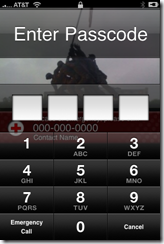
I lamented that I have that information in my iPhone, but since it’s passcoded no rescuer would be able to access my dutifully entered ICE contact information. (I then had delusions of retiring on just such an app).
There is a solution. It’s brilliantly simple, and works. Polka have written an iPhone app called “Close Call” that fits the bill perfectly. And it’s free!
I made one for this review, using a picture in my camera:
I have installed a plugin for WordPress that displays the blog contents on the iPhone on a more user-friendly way. If you don’t like it you can click the link at the very bottom of the page and get the full view.
I’m throwing this out there hoping someone has a solution.
Since I got my new iPhone several months ago it’ll go through periods where it gets a lot of wrong number calls. After several weeks of this I started asking people the number they were calling, and that’s where the weirdness comes in.
(For illustration, this isn’t my number, don’t call). My number is (817) 555-1234’ all the wrong number calls are for (555) 123-4xxx. For some reason the Bell system forgets my area code and drops in the middle three as my area code.
After about 10 calls from one person we figured out a fix, having the wrong number dialer enter a 1 before they dialed, and they’d get the number they were dialing. I suppose the good news is there’s only about 1,000 wrong number combinations I could get…
I have asked AT&T to look into it (to his credit the tech I spoke with realized it’s not something amenable to the first-level tech script, and spared me that), but I haven’t seen a change and haven’t heard back from them.
Other than getting a new number from AT&T, any ideas?
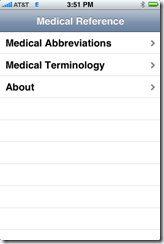
I’ve been using the above iPhone program for the last month or so, and here’s a short review and interview of the programmer. Disclosures: they gave me a free $1.99 copy to use.
My review: a very useful reference for those new to medical terminology, or who teach the same group. Could use a search function, but otherwise it’s worth the price.